What follows is a tour of how Radian works — from the TTS model behind it to the Python orchestration layer, local inference, voice generation, application architecture, packaging, and the performance optimizations that make it practical on everyday hardware. I bet you will love it.
TTS model
Radian uses Kokoro TTS, an 82M parameter, highly efficient open-weight text-to-speech model. It was inspired by the StyleTTS 2 architecture and gained popularity for producing natural, human-like speech while remaining significantly smaller and more efficient than many much larger models. That balance between quality, model size, and inference speed made Kokoro the first choice for Radian.
Why Kokoro?
The main idea behind Radian was simple: good AI voice generation should not require a cloud API or a powerful GPU. Kokoro makes this possible by providing surprisingly high-quality speech while keeping the computational requirements relatively low.
- Small Model : At around 82M parameters, Kokoro is dramatically smaller than many modern generative audio models.
- Efficient Inference : The model can run locally without requiring a dedicated high-end GPU.
- Open Weights : The model can be bundled and executed locally instead of sending text to a third-party API.
- Natural Speech : Produces expressive and natural-sounding speech suitable for narration, videos, accessibility, and everyday TTS.
Key features of Kokoro TTS
- Model Size : The original PyTorch weights can be significantly larger, while optimized ONNX versions can reduce the footprint considerably.
- Hardware Compatibility : Designed for efficient inference and usable on relatively low-resource hardware.
- Voice Styles : Supports a large collection of voices across multiple languages and accents.
- Audio Output : Generates speech at a 24 kHz sampling rate for high-quality audio output.
Python backend
Radian keeps the actual speech synthesis pipeline separate from the desktop UI. The Electron application handles the interface and user interaction, while a lightweight Python FastAPI backend is responsible for loading the model and generating audio.
When the user enters text, the desktop application sends it to the local backend through an HTTP request. The backend processes the text, runs it through the Kokoro pipeline, synthesizes the speech, saves the generated audio, and returns the result back to the desktop application.
Text → Electron UI → FastAPI → Kokoro TTS → Audio → Electron
Because the backend runs locally, the text does not need to leave the user's machine. There is no external TTS API involved in the core generation pipeline, which also means there are no per-request API costs and the application can continue working without an internet connection once the required model files are available.
Local inference
One of the main design decisions behind Radian is local inference. Instead of uploading text to a cloud provider, Radian keeps the complete synthesis pipeline on the user's machine.
- Privacy : Text stays on the local machine during synthesis.
- No API Cost : There is no per-character or per-request TTS billing.
- Offline Usage : Voice generation can work without a network connection after installation.
- Lower Latency : Requests do not need to travel to a remote inference server.
Application architecture
Radian is essentially split into two layers. The Electron frontend is responsible for the user experience, while the Python service owns the machine-learning workload.
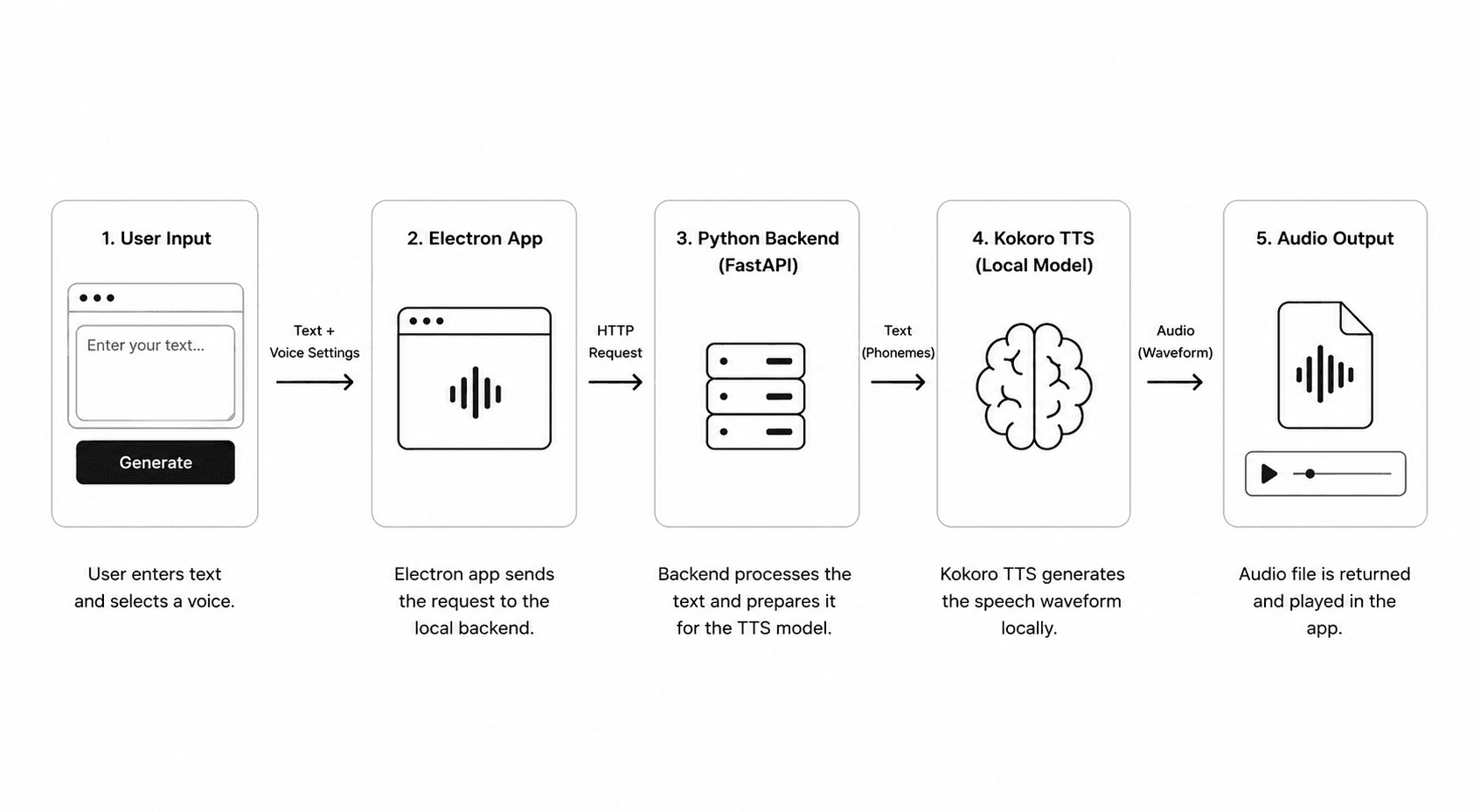
This separation also makes the project easier to maintain. The UI does not need to understand the internals of the neural network, while the Python backend can evolve independently as the model, inference runtime, or audio pipeline changes.
Audio generation pipeline
The complete generation process is intentionally straightforward. Radian receives raw text from the user, processes it through the TTS pipeline, and produces an audio file that can be played directly from the desktop application.
- 1. Text Input : The user enters or pastes the text into Radian.
- 2. API Request : Electron sends the text and selected voice configuration to the local FastAPI server.
- 3. Text Processing : The backend prepares the input for the TTS pipeline and handles pronunciation processing.
- 4. Model Inference : Kokoro generates the speech waveform locally.
- 5. Audio Export : The generated waveform is encoded and returned as an audio file.
- 6. Playback : Electron loads the resulting audio and makes it available to the user.
Pronunciation and G2P
Text-to-speech is not simply a matter of passing characters directly into a neural network. The text needs to be converted into a representation that captures how words should actually be pronounced.
Radian uses the Misaki G2P pipeline for grapheme-to-phoneme conversion, with eSpeak available as a fallback. This allows the synthesis pipeline to convert written text into phonetic representations before passing it into Kokoro.
Raw Text
↓
Text Normalization
↓
Grapheme → Phoneme
↓
Kokoro TTS
↓
Waveform
↓
Audio File
Why desktop instead of a web app?
Radian is intentionally built as a desktop application because local AI inference changes the trade-offs significantly. A web application would either need to run a heavy model inside the browser or rely on a remote inference server.
With Electron, Radian can package the user interface together with the local application environment and communicate with the Python inference service directly. This makes Radian feel more like a normal desktop utility while keeping the AI workload local.
Packaging
The application uses Electron Forge for the desktop build and packaging workflow. The goal is to turn the individual UI, Python service, inference runtime, and model assets into a setup that can be used without requiring the user to manually configure the entire development environment.
The model is also one of the largest parts of the final application footprint, so keeping the inference runtime and model assets optimized is important for distribution.
Performance
Radian is designed around a simple constraint: AI voice generation should remain useful even on machines that are not built for machine learning.
Kokoro's relatively small parameter count helps considerably here. Instead of depending on a large cloud model or a multi-billion-parameter local model, Radian can perform inference using a much smaller model while still producing high-quality speech.
- Low Model Size : Small enough to make local distribution practical.
- CPU-Friendly : Designed to remain usable without requiring a high-end GPU.
- Local Execution : Avoids network latency and remote inference infrastructure.
- Efficient Runtime : ONNX-based inference helps keep the deployment lightweight.
What I wanted Radian to solve
Most AI TTS products make you think about API keys, usage limits, subscriptions, character quotas, and network connectivity. I wanted something different.
Radian started with a much simpler idea: open the app, type something, choose a voice, and generate the audio. Everything important happens locally.
The project is also open source, so the implementation is not hidden behind a black-box service. You can inspect the application, understand how the pipeline works, and run the model yourself.
Technology
Final thoughts
Radian is a relatively small project, but it explores an idea I really like: bringing useful AI models directly onto the user's machine instead of turning every interaction into an API request.
Kokoro made that idea practical. Its combination of model size, synthesis quality, and inference performance makes it a great fit for a lightweight desktop TTS application.
If you want to see Radian in action, check out the demo above or visit the project website.